|
|
||
|
A COOL Picker Library with full Source Code -- CColorDialog
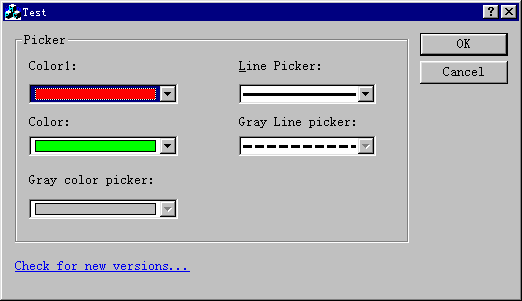
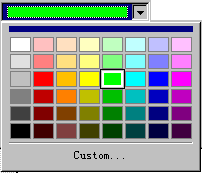
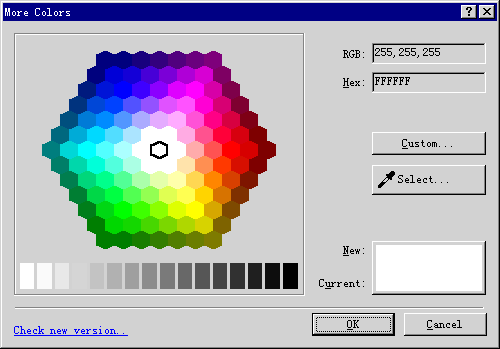
Author homepage: Picker Library V1.8 IntroductionFile reference: Prebuild version: Picker18_exe.zip 120 KB (A dialog for choosing colors) Class Ref: PickerLib18.chm 119KB (Build by UCanCode DocVizor) Source Code:Picker18_src.zip 65KB (Build with MS Visual C++ 6.0) The key features are as follows: 1.ColorPicker provides a default color panel, which includes over 144 frequent colors. 2.ColorPicker provides a custom button for opening Windows Common Color Select Dialog. You can select more color here. 3.ColorPicker provides the color contrast between current selection and new selection.
4.ColorPicker provides a select
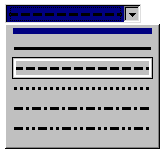
button 5.ColorPicker shows both the RGB value and Hex Value of the current selection color. 6.The color panel will load new palette as soon as the system color range has been changed. 7.ColorDropper provides 6 color panels for choosing. You can change it during run time. 8.(New)Full keyboard support. 9.Add a new Line Picker it also includes Full keyboard support. 9.The most important thing is that, we provide the full source code (100% MFC), …. Screen Shot:
(Screen 1)
(Screen 2)
(Screen 3)
(Screen 3) How to use it: The steps for usage are as follows: 1.Add code in those head files where you want to display Color Picker Dialog.
2.Add code in those files/events when you need to get color value.
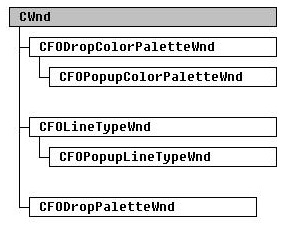
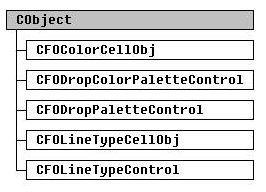
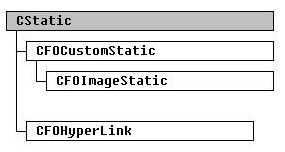
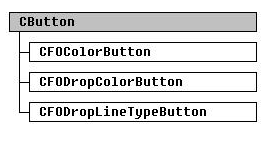
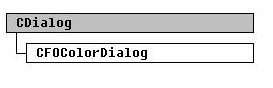
Everything is OK! Technical Details Color Picker Dialog is constructed with classes as follows; 1.CFOColorButton File Reference:FOColorButton.h, FOColorButton.cpp 2.CFODropLineTypeButton File Reference:FODropLineTypeButton.h, FODropLineTypeButton.cpp 3.CFOColorCellObj File Reference:FOColorCellObj.h, FOColorCellObj.cpp 4.CFOLineTypeCellObj File Reference:FOLineTypeCellObj.h, FOLineTypeCellObj.cpp 4.CFOColorDialog File Reference:FOColorDialog.h, FOColorDialog.cpp 5.CFOColorPaletteControl File Reference:FOColorPaletteControl.h, FOColorPaletteControl.cpp 6.CFOLineTypeControl File Reference:FOLineTypeControl.h, FOLineTypeControl.cpp 7.CFODropPaletteWndFile Reference:FODropPaletteWnd.h, FODropPaletteWnd.cpp 8.CFODropColorButton File Reference:FODropColorButton.h, FODropColorButton.cpp 9.CFODropColorPaletteControl File Reference:FODropColorPaletteControl.h, FODropColorPaletteControl.cpp 10.CFODropColorPaletteWnd File Reference:FODropColorPaletteWnd.h, FODropColorPaletteWnd.cpp 11.CFOPopupColorPaletteWndFile Reference:FOPopupColorPaletteWnd.h, FOPopupColorPaletteWnd.cpp All of the class inheritance diagrams are as follows: CWnd
CObject
CStatic
CButton
CDialog
Click here to view Our online profile and report bugs. Update V1. 8(New!)
Update V1.6(New!)
Update V1.5
Update V1.2
Downloads |
|
Copyright ?1998-2024 UCanCode.Net Software, all rights reserved.
Other product and company names herein may be the trademarks of their respective owners.
Please direct your questions or comments to webmaster@ucancode.net



 E-XD++Visual
C++/ MFC Products
E-XD++Visual
C++/ MFC Products


 , when you hold the left button
of mouse on select button, the cursor has become to a color dropper
, when you hold the left button
of mouse on select button, the cursor has become to a color dropper like Photoshop and Frontpage 2000. You can get any color on the screen via
this dropper.
like Photoshop and Frontpage 2000. You can get any color on the screen via
this dropper.