Graph layout
Component C++ .NET Source Code Links
Here are some useful add-in related
graph layout
Component C++ / .NET Source Code
links
I've started collecting. This section is still very much under
construction, and more links will be appearing in the future. If any
graph layout
Component C++ / .NET
Source Code
link
dies, please contact
me.
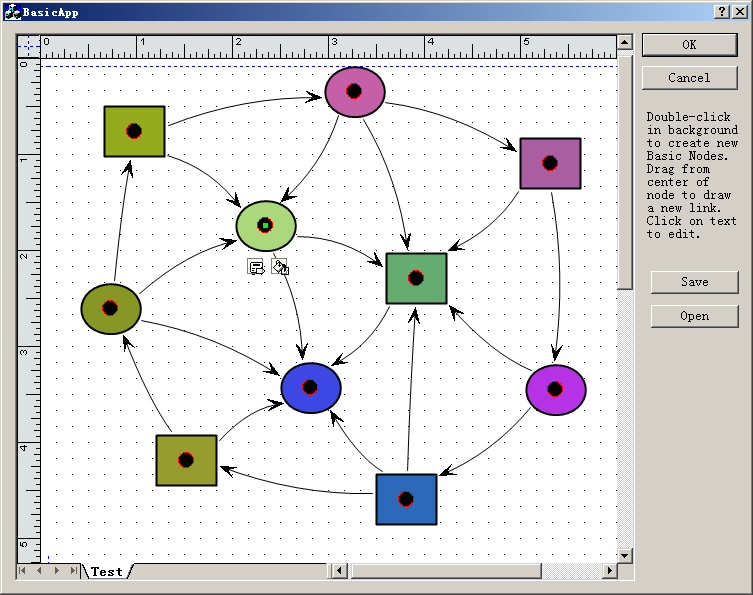
"Diagramming
business logic when developing a custom application is a time-consuming,
tedious—and necessary—process. With E-XD++ Diagramming Source Code
Kit, you can spend more time focusing on the finer points of your
customer's business and less time worrying about making the business
process diagram look good. "
 Get
Business Card / Label
Print Component
C++ Source
Codes
Add proto - logic diagram displays to your
Java, C++, and .NET applications, for the desktop and rich
internet applications.
VC++
Example:
splitter control in dialog UpdateWindow
GetWindowRect GetDlgItem
MFC
Example:
WM_KICKIDLE and CCmdUI and
ON_UPDATE_COMMAND_UI and
WM_IDLEUPDATECMDUI
MFC
Article:
Create toolbar with SetButtons and SetButtonInfo
and OnNotify
Open Source HMI / SCADA Software ToolKit, C# / C++ Codes
MFC
Library:
Drawing Spline
application with OpenGL with sample Source Code
MFC
Example:
CoInitializeEx and
SHBrowseForFolder
with file folder browser
Draw
or Paint Spline Curve Line
with VC++ Source Code
DXF
File, Read and Draw, Import and View .NET and C++ Source
Code
VC++
Example:
Loading DLLs
								LoadLibrary and
								GetProcAddress and
FreeLibrary
Visual
Studio example
and Visual Studio Tutorial and mfc tree control
OpenGL Line draw, 2D Graphics, and Render Article and Samples
Code
OpenGL 3D Graph ActiveX Control
WinCE MFC TCP
SOCKET AND UDP SOCKET Sample Codes
2D CAD Draw Application with C# Source Code
Screen Capture , to Clipboard, C++ Source Code,
Get bitmap of Window
Play
MP3 File and MP3 Palyer with Visual C++ Source
Codes
CAD 2D Draw -
Geometry Library with VC++ Source Codes
GDI+
Example:
Draw
Curve ActiveX Control
GraphicsPath and Graphics
CXImage
Library, PNG, Show, Pocket PC with VC++ Sample
Download Visual Assist
ADO MFC Visual
C++ ODBC OLE DB Codes
VC++ MFC Codes:
Display Message Balloon Tip
Window with SetWindowRgn and CreateRectRgn and
CombineRgn
Store
and read from XML File
with .NET
and C# framework, C++/MFC Example
Visual C++ Article:
free image library
with
image viewer with
CxImage and CListCtrl
thumbnail images
MFC
Example:
Merge Menu with CreatePopupMenu and
GetMenuItemCount GetSubMenu and AppendMenu and
InsertMenu
Graphics Drawing Tool by with C#
Source Code
MFC
Example:
Docking CSizingControlBar Windows inside ActiveX
Control with CFrameWnd and SetTimer
Draw, Print and encode UPCA barcode
and UPCE barcode, and EAN13 barcode
with VC++ Codes
MFC
visualisation software:
Create and draw Thumbnail View
with CWinApp and
CDocTemplate and CMultiDocTemplate
UML Case Diagram, UML Sequence
Diagram, VC + +/.NET visualization component library source
code
VC++
Example:
Add VBScript and JScript support in VC++
applications
with Script ActiveX Control MSSCRIPT.OCX
VC++
Sample:
Multiple Views layout of
RepositionBars and DeferWindowPos with
RecalcLayout and UpdateAllViews
UML
Diagram Component / Drawing C++ Source Code Solution
from UCanCode,
it will save you 50% - 80% time for building any UML based application.
VC++ Example
Capture Print Screen to
Clipboard including
dropdown menu,
SetWindowsHookEx
and
UnhookWindowsHookEx,
with
RegisterWindowMessage
XD++
MFC Library
provide
your windows appliation with advanced
diagramming
and flowcharting
abilities.
XD++
Pro a
graphical
component that allows developers to quickly build any kind of
graphical
applicatons.
E-XD++
Pro Enrich your application with
flowchart
/ workflow
/ organizational
diagramming.
E-XD++
Enterprise a VC++ / .NET Framework for developing microsoft
visio like interactive 2d
graphics
and diagramming
applications.

First time here?
|
 Product
Tour Product
Tour
E-XD++ graph layout Component product walkthrough
Screenshots
Applications built on E-XD++ graph layout Component
Product
feature comparison
Powerful, flexible, and
easy to use Diagram Components.
Powerful and flexible enough to create diagrams exactly the way you want
them to appear. So easy to use that you will be able to prototype your
application in just a few minutes.
Feature rich.
With features such as automatic layout, multiple layers, collapsible
sub-graphs, snap-to connection points, XML, SVG, and more, E-XD++ Have the
power and flexibility you need to create sophisticated diagrams, quickly and
easily. Events such as click, double-click, hover, select, rubber-band
select, copy, delete, resize and move are supported. Operations such as
drag-and-drop, unlimited undo/redo, and clipboard operations are common and
complex, and are expected by today's sophisticated users. it full supports
importing ArcGis, SVG and DXF File format.
Performance and
Scalability.
UCanCode E-XD++ Capable of handling many thousands of nodes and edges, up to
hundreds of thousands depending upon the complexity of the nodes you wish to
draw and the operations you wish to allow. Our graphical classes are
extremely lightweight objects enabling outstanding performance.
Save Time and Money and gain Reliability.
A diagram is worth 1,000 words, and E-XD++ is shipped with more than 500,000 lines of well designed and well tested code! It is used by hundreds of the world's most quality conscious companies. It will saves you thousands of hours of complex coding and years of maintenance. |
|
|
| We
Can Make Your Project Successful !
E-XD++
MFC/graph layout Component Enterprise Edition is the the world’s
leading MFC/C++ visualization component (MFC/graph layout Component
Source Code). Renowned for incredibly
rich graphics, E-XD++ MFC/graph layout Component
Source Code helps developers build applications that offer
unparalleled functionality.
|
Outstanding productivity lowers project
risk and reduces maintenance headaches. With 8 years of dedicated
research and development, UCanCode leads the market for
visualization technologies, providing outstanding customer support.
with E-XD++ MFC/graph layout Component
Source Code Enterprise you can easily build Visio
2003 like applications with Graph
Drawing. |
| E-XD++
MFC/graph layout Component
Library Professional Edition
is a MFC/graph layout Component Source Code for developing Microsoft Visio like interactive 2D graphics and
diagramming applications. E-XD++ MFC/graph layout Component
Source Code stores graphical objects in a node
(scene) graph and renders those objects onto the screen.
Visual
C++.NET MFC Library
|
E-XD++ MFC/graph layout Component
product supports both vector and raster graphics on the drawing
surface. E-XD++ MFC/graph layout Component
Source Code includes all the features of XD++
MFC/graph layout Component Source Code
Professional Edition, it also includes many new important feature of
Visio 2013 or
Visio 2017. |
| UCCDraw
ActiveX Control is an ActiveX control that allows creation
and editing of Visio-style
charts from within your application. Allows you to create graph layout
Components, vector drawings,
graph layout
Component
Source Code,
raster images and more with the ability to
include hyperlinks and various shading and coloring effects. |
The base framework of
UCCDraw ActiveX Control is XD++ MFC/graph layout Component
Source Code You can
group objects together, include images and text, link them together
and apply custom drawing effects to create charts similar to
Microsoft Visio, Adobe Illustrator, and CorelDRAW |
|
XD++
MFC Library Standard Edition provides Microsoft
Foundation Class (MFC)/graph layout Component
Source Code
developers
with a complete library of MFC extension classes which implement a
drag and drop (e.g. Visio) graphical interface. These classes fill
many of the holes existing in the Windows Graphics Device Interface
(GDI) and allow developers to incorporate custom graphical objects
and enhanced drawing capabilities into their applications.
|
All
of these classes fit seamlessly with MFC/C++, and inherit many of
MFC/C++'s
existing classes. Easily give your application a new look in
minutes!
|
| TFC
MFC/graph layout Component Gives you all the components your development
team needs to display or select date and/or time values in any
application. |
By including a Month calendar control, a Year calendar
control. TFC/C++ makes it easy to incorporate robust calendar features
in your program's interface today. |
| ToolBox is a free
Product for all Visual Studio developer, it includes three tools.
1. ToolBox --- Replace
all in files with any conditions as you asign. This tool
searches for the conditions you supply and replaces it in all the
files in the selected directory and it's subfolders. You can add as
many conditions as you want.
2. ToolBox ---Rname an
existing Microsoft Visual graph layout
Component
or
projects This tool help you rename an existing Visual Studio project. ToolBox
uses an intelligent algorithm based on the project type to identify
strings within the project files that contain the project
name/filename,
1. drawing application,
2. diagramming application,
3.drawing software,
4. diagramming software,
5. visual software,
6. development,
7. software developer,
8. software development, 9. visual component,
10. visual component software,
11. high-tech, high-technology,
12. high-tech company,
13. high-tech companies,
14. high technology,
15. high technology company |
3. ToolBox --- Backup
an existing Microsoft Visual Studio Project. This tool help you
backup an existing Microsoft Visual Studio Project, or C++
Project.
All these tools are free without any charge, if you want learn more
about ToolBox or download a free copy,
1.layout technology
2. graph editor
3.graph editing,
4. graph display
5. graph drawing
6. graph drawing software,
7. graph drawing library,
8. graph drawing component
|
graph layout, and
graph layout library, with graph layout software, also with graph
algorithms, and graph theory, it can do graph modeling and graph
analysis
1. network analysis,
2.
flow analysis,
3. network flow analysis
News:
1 UCanCode Advance E-XD++
CAD Drawing and Printing Solution
Source Code Solution for C/C++, .NET V2025 is released!
2
UCanCode Advance E-XD++
HMI & SCADA Source Code Solution for C/C++, .NET V2025 is released!
3
UCanCode
Advance E-XD++ GIS SVG Drawing and Printing Solution
Source Code Solution for C/C++, .NET V2025 is released!
Contact UCanCode Software
To buy the source code or learn more about with:
|
|









