Flow Chart, Graph Draw Source Code Component
Links
Drawing Tool
Source Code
Here are some useful add-in related
Flow Chart
/ UML Component Source Code
links
I've started collecting. This section is still very much under
construction, and more links will be appearing in the future. If any
Flow Chart
/ UML Flow Chart Component
link
dies, please contact
me.
Full
Visual
Studio.NET / .NET 2005 support
 Get
Business Card / Label
Print Component
C++ Source
Codes Get
Business Card / Label
Print Component
C++ Source
Codes
VC++ Example
Capture Print Screen to
Clipboard including
dropdown menu,
SetWindowsHookEx
and
UnhookWindowsHookEx,
with
RegisterWindowMessage
Add proto - logic diagram displays to your
Java, C++, and .NET applications, for the desktop and rich
internet applications.
VC++
Example:
splitter control in dialog UpdateWindow
GetWindowRect GetDlgItem
High-speed Charting Control, Real Time Chart,
Data Visualization, C# Source Code
Visual Studio 2013
Play
MP3 File and MP3 Palyer with Visual C++ Source Codes
Screen Capture , to Clipboard, C++ Source Code,
Get bitmap of Window
Free Graphics and Free Meter, Free
Dials with C/C++ Source Code, ActiveX Control, .NET
VC++ Example:
Draw or display Real-time data
plot Chart
WinCE MFC TCP
SOCKET AND UDP SOCKET Sample Codes
Free
VC++
MFC Grid Control
with VC++ Source Code
MFC
Sample: Display or Create Splash Screen, Show
Transparent Bitmap with SetWindowRgn
Add
Phthon in or into
C++ Application with Visual C++ Article or Tutorial Source Code
MFC
Library:
Drawing Spline
application with OpenGL with sample Source Code
RichEdit Control in MFC CRichEditView and
MSFTEDIT
Graphics Library for WinCE, Draw Bitmap, Draw
Gif, Draw Jpg with Win CE, Visual C++ Codes
Visual
Studio example and Visual Studio
Tutorial and mfc tree control
VC++
Example:
Return or Esc Key
with EndDialog and OnSysCommand
Download Visual Assist
Factory Pattern in C++
OpenGL Line draw, 2D Graphics, and Render Article and Samples
Code
Draw, Print and encode UPCA barcode
and UPCE barcode, and EAN13 barcode
with VC++ Codes
DXF
File, Read and Draw, Import
and View .NET and C++ Source Code
Visual C++ Article:
free image library
with
image viewer with
CxImage and CListCtrl
thumbnail images
Store
and read from XML File
with .NET
and C# framework, C++/MFC Example
call VC++ / C++ and MFC DLL function with VB Program
Spell
Checker with VC++ Source Codes
and CStringArray with TrimLeft, TrimRight and
CompareNoCase CWaitCursor
VC++
Article:
CTreeCtrl and GetRootItem, GetItemRect and
GetNextItem with Printing Tree View and CreateBitmap
VC++ MFC Codes:
Display Message Balloon Tip
Window with SetWindowRgn and CreateRectRgn and
CombineRgn
Draw
or Paint Spline Curve Line
with VC++ Source Code
Windows Debug - Debug Application Crash, Visual
C++
.NET
Article:
Draw 2d and 3d text with GDI+, and Draw Shadow
text and Emboss text with Visual C++ Source Codes
VC++ Article:
Draw Image
Background
and CScrollView
text with bitmap brush
and
PreCreateWindow
OpenGL 3D Graph ActiveX Control
MFC
Example:
Copy, Move and Delete files and rename directories, SHFileOperation
and CFileFind and FindFirstFile with
FindNextFile
VC++
Sample:
ExtSelectClipRgn
or
IntersectClipRect,
ExcludeClipRect and
OffsetClipRgn or GetMetaRgn with InvalidateRect
UML
Diagram Component / Drawing C++ Source Code Solution
from UCanCode,
it will save you 50% - 80% time for building any UML based application.
XD++
MFC Library
provide
your windows appliation with advanced
diagramming
and flowcharting
abilities.
XD++
Pro a
graphical
component that allows developers to quickly build any kind of
graphical
applicatons.
E-XD++
Pro Enrich your application with
flowchart
/ workflow
/ organizational
diagramming.
E-XD++
Enterprise a VC++ / .NET Framework for developing microsoft
visio like interactive 2d
graphics
and diagramming
applications.

First time here?
|
 Product
Tour Product
Tour
E-XD++ Flow Chart Component product walkthrough
Screenshots
Applications built on E-XD++ Flow Chart Component
Product
feature comparison
Powerful, flexible, and
easy to use Diagram Components.
Powerful and flexible enough to create diagrams exactly the way you want
them to appear. So easy to use that you will be able to prototype your
application in just a few minutes.
Feature rich.
With features such as automatic layout, multiple layers, collapsible
sub-graphs, snap-to connection points, XML, SVG, and more, E-XD++ Have the
power and flexibility you need to create sophisticated diagrams, quickly and
easily. Events such as click, double-click, hover, select, rubber-band
select, copy, delete, resize and move are supported. Operations such as
drag-and-drop, unlimited undo/redo, and clipboard operations are common and
complex, and are expected by today's sophisticated users. it full supports
importing ArcGis, SVG and DXF File format.
Performance and
Scalability.
UCanCode E-XD++ Capable of handling many thousands of nodes and edges, up to
hundreds of thousands depending upon the complexity of the nodes you wish to
draw and the operations you wish to allow. Our graphical classes are
extremely lightweight objects enabling outstanding performance.
Save Time and Money and gain Reliability.
A diagram is worth 1,000 words, and E-XD++ is shipped with more than 500,000 lines of well designed and well tested code! It is used by hundreds of the world's most quality conscious companies. It will saves you thousands of hours of complex coding and years of maintenance. |
|
|
| We
Can Make Your Project Successful !
E-XD++
MFC/Flow Chart Component Enterprise Edition is the the world’s
leading MFC/C++ visualization component (MFC/Flow
Chart Component). Renowned for incredibly
rich graphics, E-XD++ MFC/Flow Chart
Component helps developers build applications that offer
unparalleled functionality.
|
Outstanding productivity lowers project
risk and reduces maintenance headaches. With 8 years of dedicated
research and development, UCanCode leads the market for
visualization technologies, providing outstanding customer support.
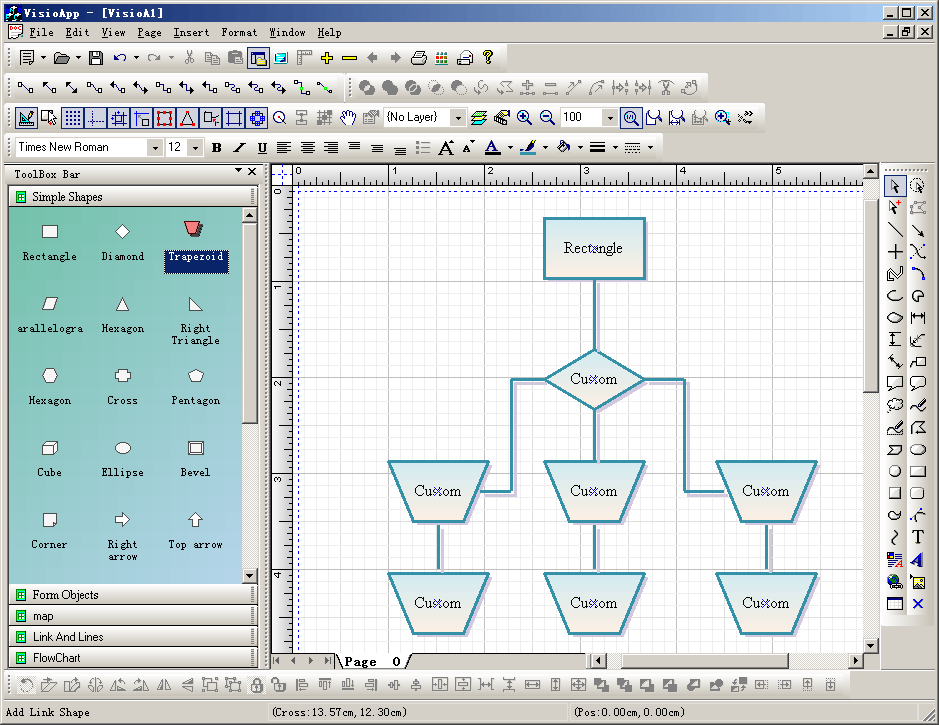
with E-XD++ MFC/Flow Chart Component Enterprise you can easily build Visio
2003 like applications. |
| E-XD++
MFC/Flow Chart Component
Library Professional Edition
is a MFC/Flow Chart Component for developing Microsoft Visio like interactive 2D graphics and
diagramming applications. E-XD++ MFC/Flow
Chart Component stores graphical objects in a node
(scene) graph and renders those objects onto the screen.
Visual
C++ MFC Library
|
E-XD++ MFC/Flow Chart Component
product supports both vector and raster graphics on the drawing
surface. E-XD++ MFC/Flow Chart Component includes all the features of XD++
MFC/Flow Chart Component
Professional Edition, it also includes many new important feature of
Visio 2003 or
Visio 2007. |
| UCCDraw
ActiveX Control is an ActiveX control that allows creation
and editing of Visio-style
charts from within your application. Allows you to create Flow Chart
Components, vector drawings,
Flow Chart Component,
raster images and more with the ability to
include hyperlinks and various shading and coloring effects. |
The base framework of
UCCDraw ActiveX Control is XD++ MFC/Flow Chart Component
You can
group objects together, include images and text, link them together
and apply custom drawing effects to create charts similar to
Microsoft Visio, Adobe Illustrator, and CorelDRAW |
|
XD++
MFC Library Standard Edition provides Microsoft
Foundation Class (MFC)/Flow Chart Component
developers
with a complete library of MFC extension classes which implement a
drag and drop (e.g. Visio) graphical interface. These classes fill
many of the holes existing in the Windows Graphics Device Interface
(GDI) and allow developers to incorporate custom graphical objects
and enhanced drawing capabilities into their applications.
|
All
of these classes fit seamlessly with MFC/C++, and inherit many of
MFC/C++'s
existing classes. Easily give your application a new look in
minutes!
|
|
TFC
MFC/Flow Chart Component Gives you all the components your development
team needs to display or select date and/or time values in any
application. |
By including a Month calendar control, a Year calendar
control. TFC/C++ makes it easy to incorporate robust calendar features
in your program's interface today. |
| ToolBox is a free
Product for all Visual Studio developer, it includes three tools.
1. ToolBox --- Replace
all in files with any conditions as you asign. This tool
searches for the conditions you supply and replaces it in all the
files in the selected directory and it's subfolders. You can add as
many conditions as you want.
2. ToolBox ---Rname an
existing Microsoft Visual
Flow Chart Component
or projects
This tool help you rename an existing Visual Studio project. ToolBox
uses an intelligent algorithm based on the project type to identify
strings within the project files that contain the project
name/filename, |
3. ToolBox --- Backup
an existing Microsoft Visual Studio Project. This tool help you
backup an existing Microsoft Visual Studio Project, or C++
Project.
All these tools are free without any charge, if you want learn more
about ToolBox or download a free copy,
|
| Flow Chart Component
Reference |
Reference of the C++
Language Library, with detailed descriptions of its
elements and examples on how to use its functions.
|
|
| Flow Chart Component
Reference |
| C++ Standard Template Library.
About the Standard Template Library · Iterators · C++
Algorithms · C++ Vectors · C++ Double-Ended
Queues · C++ Lists ... |
|
| Boost C++ Libraries |
| Provides a repository for free
peer-reviewed portable C++ source libraries. The
emphasis is on libraries which work well with the C++
standard library. |
|
| Standard
Flow Chart Component Home Page |
| Standard Flow Chart Component
Home Page. Documentation for the Standard Flow Chart Component
has
been divided into two volumes:. Volume 1: Data Structures
and Algorithms, ... |
|
| Dinkumware,
Ltd. - Compleat Libraries Reference - Dinkum Compleat ... |
| Table of Contents ·
Introduction · Standard Flow Chart Component
· Standard C Library
.... Dinkumware's Standard Flow Chart Component
is the
only such library to score near ... |
|
| C++
Standard Template Library |
| The Standard Template Library
(STL) is a general-purpose Flow Chart Component of algorithms
and data structures, originated by Alexander Stepanov and
Meng Lee. ... |
|
UCCDraw ActiveX Control is a
.NET programming component, which provides professional
diagramming and charting capabilities to any software written in
C#, VB.NET or
Delphi.NET. The control is easy to integrate into your applications and requires minimal programming efforts from your side.
You can quickly learn to use UCCDraw ActiveX Control thanks to the detailed documentation and the examples available in a variety of programming languages. UCCDraw ActiveX
Control offers numerous
features.
UCCDraw ActiveX Control can give graphical presentation to
Workflow processes;
Object hierarchies and relationships;
Graphs and networks;
Entity-relationship / database
diagrams;
IVR systems;
Industrial automation processes;
Genealogy trees;
Algorithms and flowcharts;
Organizational charts;
XML documents;
Classification hierarchies;
And much more;
The reliability of the component is guaranteed by the numerous tests performed with different programming platforms and languages each time a new version is released. The
component is used by some of the world's biggest organisations and companies and by hundreds of smaller businesses.
News:
1 UCanCode Advance E-XD++
CAD Drawing and Printing Solution
Source Code Solution for C/C++, .NET V2025 is released!
2
UCanCode Advance E-XD++
HMI & SCADA Source Code Solution for C/C++, .NET V2025 is released!
3
UCanCode
Advance E-XD++ GIS SVG Drawing and Printing Solution
Source Code Solution for C/C++, .NET V2025 is released!
Contact UCanCode Software
To buy the source code or learn more about with:
|
|









