Dashboard
Gauge
Diagram Component Solution
with C++ Source Code,
Drawing
Tool
Dashboard
Gauge
Diagram
Solution
C++ source code is ready
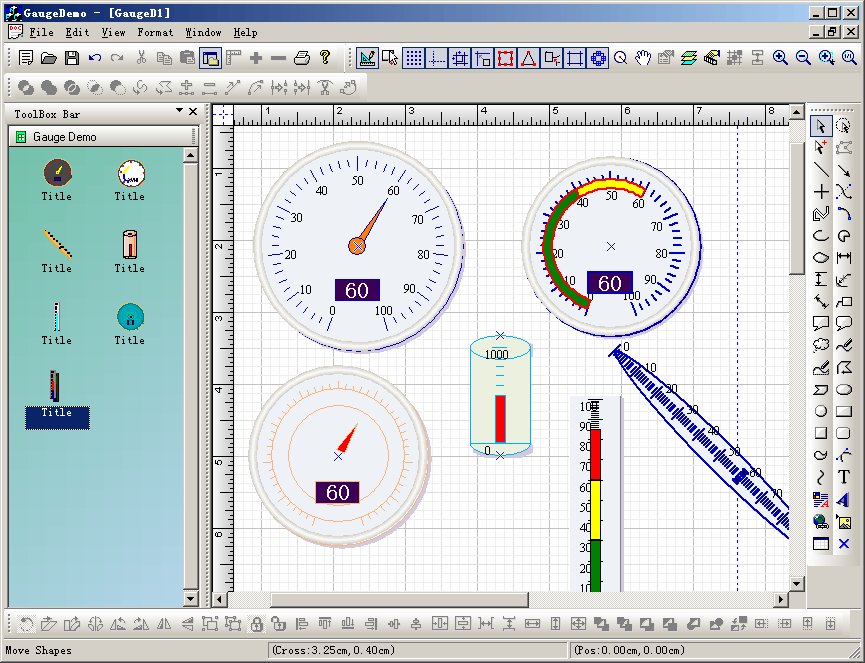
with E-XD++ Enterprise, see sample GaugeDemo, as
below:
Dashboard
Gauge Control Source Codes
E-XD++ Diagramming Library ships with a
variety of pre-built dashboard gauges
and controls, but dashboards
and system monitoring solutions often require custom diagramming
symbols to quickly and effectively convey multi-variable status
information to end users. For example, a water tank in a manufacturing
plant may need to physically appear on the diagram
as it does in real life to give users an immediate visual cue of the piece
of equipment on the screen, indicate the water level in the tank as an
area that expands and collapses, and possibly even show other values like
PH level or pressure by changing the color of the tank content. E-XD++ Diagramming Library
provides an extensible model for building new diagramming
symbols that allows you to account for any status information you need to
display. Building a new symbol is very similar to designing a new shape.
E-XD++ Diagramming Library also ships
with a variety of graphical elements to aid in the symbol creation
process.
The UCanCode Dashboard Gauge
Shapes is a set of classes built to display numeric values in a
graphical manner as part of E-XD++ applications.
The classes implement CObject that display a scale with
regular markings and labels and they implement CObject that
indicate a value on a scale. It is full Visual Studio .NET
tested.
The
objects can be customized and combined to present many different kinds of
appearances. In the real
world, depending on the industry, such things are called meters, dials, or
gauges. Because there is so
much customization that can be done, Gauge Classes does not provide
any prebuilt instruments. The
GaugeDemo sample application, however,
does define many such objects for various purposes and with various
appearances and behaviors. For other like of Dashboard
Gauge
Shapes, you can build it by yourself.
The Dashboard
Gauge solution source code
is an excellent kit. The most important properties are easily changed, and
it is a snap to experiment with different looks. The consistent use of
state indicators, numeric indicators and labels across gauge
types makes it easy to present any information...
Most
of the UCanCode Gauge objects you see are instances of subclasses of the
standard CFODrawShape class. Each
Dashboard Gauge
has a Background shape (Mostly it uses the exist E-XD++ shapes), a Scale,
an Indicator, and a text Label.
The UCanCode Dashboard
Gauge
library principally consists of the basic Meter
Scale and Indicator classes and the Meter
class that is a group—a collection of objects including a scale and an
indicator.
You
can create any new Dashboard gauge
objects by using the exist E-XD++ shape classes, these shape classes will
be as the background shape of the Gauge
objects.
The leader in visualization
component -- FULL VC++ Source Code Shipped!
XD++ Diagrammer Suite
is the the world’s leading VC++ and .NET visualization
component. Renowned for incredibly rich graphics, XD++
helps thousands developers build applications that offer
unparalleled functionality. Outstanding productivity
lowers project risk and reduces maintenance headaches.
With 20 years of dedicated research and development,
UCanCode leads the market for visualization
technologies, providing outstanding customer support.
Powerful, flexible, and
easy to use Diagram Components.
Powerful and flexible enough to create diagrams exactly the way you want
them to appear. So easy to use that you will be able to prototype your
application in just a few minutes.
Feature rich.
With features such as automatic layout, multiple layers, collapsible
sub-graphs, snap-to connection points, XML, SVG, and more, E-XD++ Have the
power and flexibility you need to create sophisticated diagrams, quickly and
easily. Events such as click, double-click, hover, select, rubber-band
select, copy, delete, resize and move are supported. Operations such as
drag-and-drop, unlimited undo/redo, and clipboard operations are common and
complex, and are expected by today's sophisticated users. it full supports
importing ArcGis, SVG and DXF File format.
Performance and
Scalability.
UCanCode E-XD++ Capable of handling many thousands of nodes and edges, up to
hundreds of thousands depending upon the complexity of the nodes you wish to
draw and the operations you wish to allow. Our graphical classes are
extremely lightweight objects enabling outstanding performance.
Save Time and Money and gain Reliability.
A diagram is worth 1,000 words, and E-XD++ is shipped with more than 500,000 lines of well designed and well tested code! It is used by hundreds of the world's most quality conscious companies. It will saves you thousands of hours of complex coding and years of maintenance.
 VC++ Example
Capture Print Screen to
Clipboard including
dropdown menu,
SetWindowsHookEx
and
UnhookWindowsHookEx,
with
RegisterWindowMessage
VC++ Example
Capture Print Screen to
Clipboard including
dropdown menu,
SetWindowsHookEx
and
UnhookWindowsHookEx,
with
RegisterWindowMessage
VC++ MFC Project Setting, Unicode,
MBCS,_MBCS
or
_UNICODE,
wWinMainCRTStartup
Get
Business Card / Label
Print Component
C++ Source Codes
MFC
Source Code:
WindowFromPoint and GetDlgItem or ScreenToClient
Visual C++ Article:
free image library
with
image viewer with
CxImage and CListCtrl
thumbnail images
VC++ Example:
Draw or display Real-time data
plot Chart
OpenGL printing and Print Preview with Visual C++
Real Time Graph Control, Plot ActiveX Control
with Visual C++
Screen Capture , to Clipboard, C++ Source Code,
Get bitmap of Window
ADO MFC Visual
C++ ODBC OLE DB Codes
High-speed Charting Control, Real Time Chart,
Data Visualization, C# Source Code
Draw, Print and encode UPCA barcode
and UPCE barcode, and EAN13 barcode
with VC++ Codes
Open Souce VC++ Code and MFC Code Site,
VC++ FAQ Site and Tutorial Site
C# Example:
Free Draw .NET GDI+ Gauge Control
with Source Code
Add proto - logic diagram displays to your
Java, C++, and .NET applications, for the desktop and rich
internet applications.
UML
Diagram Component / Drawing C++ Source Code Solution
from UCanCode,
it will save you 50% - 80% time for building any UML
based application.
 Download Prebuild Diagram
Editor
Download Prebuild Diagram
Editor
The
VC++ source codes of this tool is shipped with E-XD++
Library Enterprise Edition, order it now.

News:
1 UCanCode Advance E-XD++
CAD Drawing and Printing Solution
Source Code Solution for C/C++, .NET V2025 is released!
2
UCanCode Advance E-XD++
HMI & SCADA Source Code Solution for C/C++, .NET V2025 is released!
3
UCanCode
Advance E-XD++ GIS SVG Drawing and Printing Solution
Source Code Solution for C/C++, .NET V2025 is released!
Contact UCanCode Software
To buy the source code or learn more about with:









