 |
E-XD++ Enterprise Edition -- Product Information
|
|
|
|
32. Auto-Snapping
When creating, editing shapes on canvas, E-XD++ could automatically
snap vertexes of shapes, control points, intersection
points, etc. It can also
snap nearby grid points, borders of canvas or nearby auxiliary lines, etc.
Shown as follows:
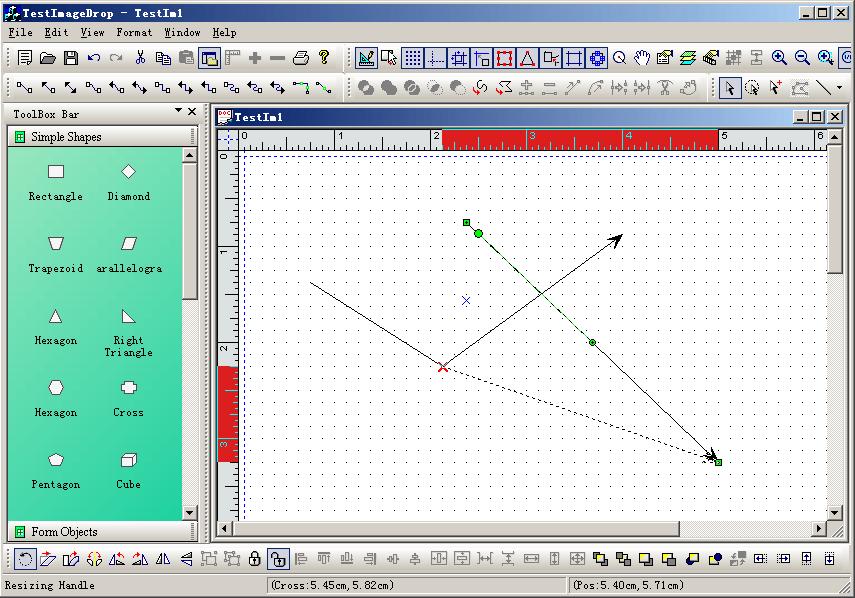
These are very important for drawing high-precision shapes (such as shapes in
CAD).
These features can be customized. If you want to extend current capture method, just overwrite the following functions in class CFODataModel:
// Pick nearest point,this is used for glue
mode, when you moving near a shape, it will glue to its
// control handle point or the shapes vector points.
// m_SelectList -- List of shapes for glue.
// ptPick -- nearest glue point,this is a return point.
// ptHit -- HitTest logical point.
// bWithSelection -- if it is true,itself will be used for glue.
virtual BOOL PickNearestPoint(const CFODrawShapeList &m_SelectList,
// Nearest point.
CPoint &ptPick,
// Mouse hit point.
const CPoint &ptHit,BOOL bWithSelection = FALSE);
E-XD++ has a feature of restricting editing area on canvas. When
this feature is enabled, all operations (such as drawing, editing, etc) on shapes are restricted inside the canvas, and are not allowed to move to outside of the canvas.
To enable this feature, call the following functions in CFODataModel:
// Set point limit with
page, when we move the mouse on the canvas, mostly we want that the mouse cursor
// only showing within the canvas, this method is defined for this case. If bLimit is
TRUE, this cursor will
// be limited within the canvas.
void SetPointLimitWithPage(const BOOL &bLimit) { m_bLimitPointWithinPage = bLimit; }
|






 E-XD++Visual
C++/ MFC Products
E-XD++Visual
C++/ MFC Products




