Visual C++ Print /VC++
Printing Links
Here are some useful add-in related Visual
C++ Print / VC++ Printing links
I've started collecting. This section is still very much under
construction, and more links will be appearing in the future. If any Visual
C++/VC++ Print / Printing link
dies, please contact
me.
Java
and .NET Printing
"Diagramming
business logic when developing a custom application is a time-consuming,
tedious—and necessary—process. With E-XD++ Diagramming Source Code
Kit, you can spend more time focusing on the finer points of your
customer's business and less time worrying about making the business
process diagram look good. "
C
and C++ / VC++ MFC Tools and Components
Get
Business Card / Label
Print Component
C++ Source
Codes
MFC
VC++ Topics:
Print a bitmap full page
HMI-SCADA
Software
from UCanCode Software
VC++
MFC example: Micrsoft Visio 12 like Print Preview
Source Code
OPC, PLC, SCADA Component And Source Code
VC++ Example
Capture Print Screen to
Clipboard including
dropdown menu,
SetWindowsHookEx
and
UnhookWindowsHookEx,
with
RegisterWindowMessage
C#
Article: Graph Draw and Layout Control Source Code
Hosting
WPF
Content in an
VC++ MFC
Application
VC++
Example:
Display GIF-animatE using GDI+ with BMP,
JPEG, PNG, TIFF, EMF, WMF, DrawImage
VC++ Debug Trace, Memory Check, Assert Article,
DebugOutputString CMemoryState A C++
Projects
HMI Graphics Component
with
VC++ Source Code
Visual Studio 2013
Free Graphics and Free Meter, Free
Dials with C/C++ Source Code, ActiveX Control, .NET
Visual C++ MFC
Class Wizard
DCS PLC HMI SCADA
Visual C++ Express
Download
 Data
Preprocessing And
Visualization In
C++ Data
Preprocessing And
Visualization In
C++
Indusoft
- like HMI Software, SCADA System, OPC, Web Studio, Web
SCADA, VC++ Source
Code 2025
DXF File, Read and Draw, Import and View .NET and C++
Source Code
Add Phthon
in or into C++ Application with Visual C++ Article or Tutorial Source Code
VC++
Example:
splitter control in dialog UpdateWindow
GetWindowRect GetDlgItem
HMI & SCADA Designer and ProgressBar
Factory Pattern in C++
C++
Blog
MFC
Source Code:
SQLPrepare and SQLAllocStmt with CDBException
and SQL Query and ExecuteSQL
Visual C++
2008 Feature Pack:
MFC Visual
Studio Office 2007 Style Enhancements
Printing ActiveX Controls,
C++ Source Code
Play GIF, Load GIF, GIF
Animate, with GDI+ Example
High-speed Charting Control, Real Time Chart,
Data Visualization, C# Source Code
Download Visual Assist
.NET
HMI & SCADA Solution.
VC++
Converting ANSI to Unicode with _MSC_VER, MBCS, Multiple Byte
PID process control, Process Simulation, PLC
Real Time, VC++ Source Code
Visual C++ Article:
free image library
with
image viewer with
CxImage and CListCtrl
thumbnail images
RegisterClipboardFormat
with COleDropSource,
CSharedFile to
drag to
word and
excel Visual C Codes
WinCE MFC TCP
SOCKET AND UDP SOCKET Sample Codes
Graphics Library for WinCE, Draw Bitmap, Draw
Gif, Draw Jpg with Win CE, Visual C++ Codes
AutoCAD File Format, Read and Write drawing with
Visual C++ Source Code
RichEdit Control in MFC CRichEditView and
MSFTEDIT
Serial Port Communication,
Read data from port Visual C++ Samples
Screen Capture , to Clipboard, C++ Source Code,
Get bitmap of Window
Create COM Object, Build COM Component, ATL Component
with Visual C++
Direct2D Vector Graphics Rendering with Visual C++, MFC
Call Lua Script in Visual C++ / MFC Sample
Windows hook programming with
VirtualProtect,SetWindowHookEx and beginthread
SCADA
Automation Programming Tool And
visualization component Control
VC++ Source Code Solution
UML
Diagram Component / Drawing C++ Source Code Solution from ucancode,
it will save you 50% - 80% time for building any UML based application.
VC++
Tool: Visual
C++ and SQL generator for ODBC Database, with
source code sample
| https://www.ucancode.com/
New
Leading Visual
C++/ VC++ Print!
|
VC++
Printing,
VC++ MFC Printing web site |
|
A
cool year selector with VC++ Samples
|
Year selector VC++
Drawing |
| A
COOL Picker
Library with full VC++ Samples
|
VC++
Code
Sample Project |
|
A
GDI pattern brush tool with VC++ Samples
|
From ucancode
software,
vc++ Samples |

First time here?
|
 Product
Tour Product
Tour
E-XD++ product walkthrough
Screenshots
Applications built on E-XD++
Product
feature comparison
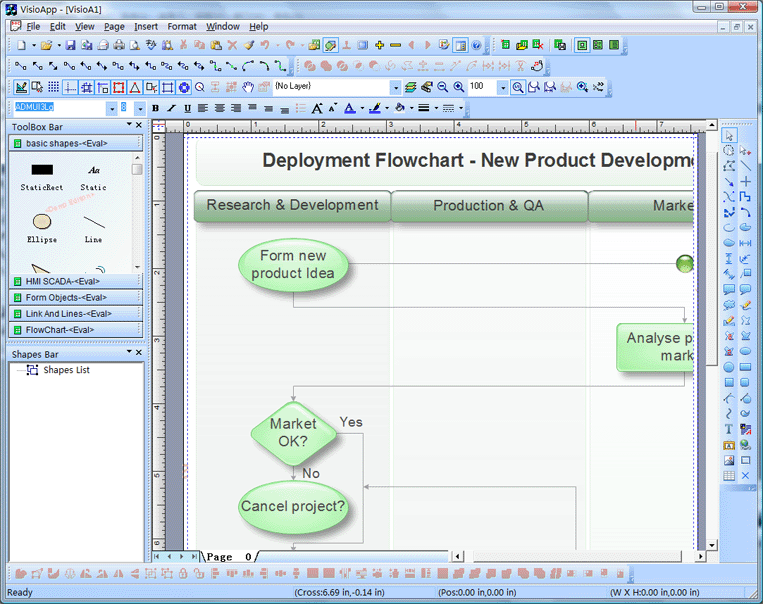
Powerful, flexible, and
easy to use Diagram Components.
Powerful and flexible enough to create diagrams exactly the way you want
them to appear. So easy to use that you will be able to prototype your
application in just a few minutes.
Feature rich.
With features such as automatic layout, multiple layers, collapsible
sub-graphs, snap-to connection points, XML, SVG, and more, E-XD++ Have the
power and flexibility you need to create sophisticated diagrams, quickly and
easily. Events such as click, double-click, hover, select, rubber-band
select, copy, delete, resize and move are supported. Operations such as
drag-and-drop, unlimited undo/redo, and clipboard operations are common and
complex, and are expected by today's sophisticated users. it full supports
importing ArcGis, SVG and DXF File format.
Performance and
Scalability.
UCanCode E-XD++ Capable of handling many thousands of nodes and edges, up to
hundreds of thousands depending upon the complexity of the nodes you wish to
draw and the operations you wish to allow. Our graphical classes are
extremely lightweight objects enabling outstanding performance.
Save Time and Money and gain Reliability.
A diagram is worth 1,000 words, and E-XD++ is shipped with more than 500,000 lines of well designed and well tested code! It is used by hundreds of the world's most quality conscious companies. It will saves you thousands of hours of complex coding and years of maintenance. |
|
Printing or
VC++ Sources
Generic Console
programs
Customized Printing Dialog using PrintDlg:
This article is about how to create a customized Print
Dialog.
Customized dialog means the customization done with the PrintDlg(..)
win32 api in Microsoft Visual C++. This article will demonstrate how
to add a paper control, an Owner-Draw button that displays the paper
and a ComboBox, which lists the PaperSizes, supported by the given
printer. When you choose a Paper from the Paper Size list, the
corresponding relative paper size is shown on the left. At the end
of the article you would be able to add controls of your own and
have the user input them and the application would make use of the
user inputs to do the rendering. An example of an application which
does customizing of the standard print dialog is Acrobat.
PrintDlg function:
PrintDlg(..) API is exported by the comdlg32.dll.The Parameter to
the API is LPPRINTDLG, a pointer to PRINTDLG.
Below is the PRINTDLG structure taken from commdlg.h:-
typedef struct tagPDW {
..
HGLOBAL hDevMode;
..
LPPRINTHOOKPROC lpfnPrintHook;
LPCWSTR lpPrintTemplateName;
..
} PRINTDLGW, *LPPRINTDLGW;
hDevMode is a handle to memory which contains the DEVMODE,
this can be sent as input to the function in which case the PrintDlg
api would use it to do the initialization of the Printer Property
sheets. If left initialized to NULL, it would contain the DEVMODE
with the user inputs made in the property sheets.
lpfnPrintHook, this contains the Hook Window Proceedure.
This function will be hit whenever the user works on the Printer
Dialog. This is enabled via the the PD_ENABLEPRINTHOOK flag in Flags
member.
lpPrintTemplateName, this contains the name of the dialog
template resource.
Steps to Create a Custom Dialog using
PrintDlg
As a first step, copy the dlgs.h from the vc++ include directory to
a file named printproc.rc.
The resource file has been modified to look like this:-
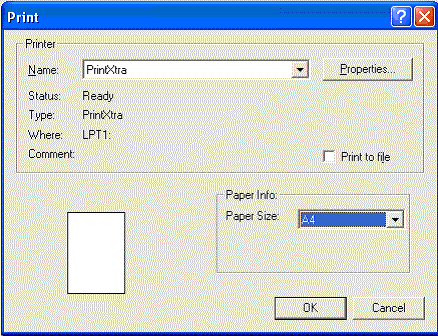
The below is the running version of the program.
Lets have a look at the PrintHook Proceedure:-
UINT_PTR CALLBACK PrintHookProc(
HWND hdlg, // handle to dialog box
UINT uiMsg, // message identifier
WPARAM wParam, // message parameter
LPARAM lParam // message parameter
)
{switch(uiMsg)
{
case WM_COMMAND:
switch(LOWORD(wParam))
{
case 1139:
if(HIWORD(wParam) == CBN_SELCHANGE)
FillPaperList(hdlg , 1139 , IDC_COMBO1);
return FALSE;
case IDC_COMBO1:
{
if(HIWORD(wParam) == CBN_SELCHANGE)
{
int sel = (int)SendMessage((HWND)GetDlgItem(hdlg , IDC_COMBO1 ),
CB_GETCURSEL, (WPARAM)0, (LPARAM)0);
HDC hdc = GetDC(GetDlgItem(hdlg , IDC_PAPERPREVIEW));
SetMapMode(hdc , MM_ISOTROPIC);
SetWindowExtEx(hdc , MaxPaperSize , MaxPaperSize , NULL);
RECT rect;
GetWindowRect(GetDlgItem(hdlg , IDC_PAPERPREVIEW) , &rect);
int width = rect.right - rect.left;
int height = rect.bottom - rect.top;
SetViewportExtEx(hdc , width , height , NULL);
DrawPaper(hdc , pPaperSizes[sel]);
SetMapMode(hdc, MM_TEXT);
ReleaseDC( GetDlgItem(hdlg , IDC_PAPERPREVIEW), hdc);
}
}
return TRUE;
}
break;
case WM_INITDIALOG:
FillPaperList(hdlg , 1139 , IDC_COMBO1);
return TRUE;
case WM_DRAWITEM:
switch(wParam)
{
case IDC_PAPERPREVIEW:
{
DRAWITEMSTRUCT *pdis = (DRAWITEMSTRUCT *)lParam;
if(pdis->itemAction & ODA_DRAWENTIRE)
{
SetMapMode(pdis->hDC , MM_ISOTROPIC);
SetWindowExtEx(pdis->hDC , MaxPaperSize , MaxPaperSize , NULL);
int width = pdis->rcItem.right - pdis->rcItem.left;
int height = pdis->rcItem.bottom - pdis->rcItem.top;
SetViewportExtEx(pdis->hDC , width , height , NULL);
POINT pt;
pt.x = 2125;
pt.y = 2794;
int sel = (int)SendMessage((HWND)GetDlgItem(hdlg , IDC_COMBO1 ),
CB_GETCURSEL, (WPARAM)0, (LPARAM)0);
if(pPaperSizes)
DrawPaper(pdis->hDC , pPaperSizes[sel]);
else
DrawPaper(pdis->hDC , pt);
SetMapMode(pdis->hDC , MM_TEXT);
return TRUE;
}
}
}
}
return FALSE;
}
What the above Proceedure does:
It does three things:-
1) WM_INITDIALOG: The Paper DropDown List is filled.
2) Whenever, the user changes the Printer in the PrinterList,it
will keep the PaperList in the dropdown to the ones supported by the
printer. case 1139:
if(HIWORD(wParam) == CBN_SELCHANGE)
FillPaperList(hdlg , 1139 , IDC_COMBO1); return
FALSE;
3) Whenever the user changes the PaperName in the PaperList, it
would set the Window and ViewPort Extents in the MM_ISOTROPIC mode
and then draw the relative size of the Paper. This is done in
case IDC_COMBO1:
4) WM_DRAWITEM and the ODA_DRAWENTIRE notification for the
IDC_PAPERPREVIEW control, the control for displaying the relative
PaperSize. The functionality is here:-
case WM_DRAWITEM: switch(wParam) { case IDC_PAPERPREVIEW: {
That almost covers 90% of what you need to customize the print
dialog using printdlg function. Download the Sample code. To compile
and run the program, do the following in the command line:
1) rc printproc.rc - This compiles the resource file
2) cl printproc.cpp printproc.res gdi32.lib comdlg32.lib
user32.lib winspool.lib - this compiles and links the exe as
printproc.exe.
Now we can Run the printproc.exe
Contact UCanCode Software
To buy the source code or learn more about with:
|
|
|