Free VC++
and
VB Graph Control Source Code
UCCDraw is a set of graph control for
creating professional-looking graph draw
graphics. UCCDraw can be used to create draw graph business diagrams,
graph control presentations,
draw and Print
VC++ Source Code organization and workflow charts, software and process flowcharts, database
structures and much much more. Using UCCDraw you can easy to add Microsoft
Visio like editor to your application. UCCDraw use next generation GDI+
graphics.
| UCCDraw
ActiveX Control is an ActiveX control that allows creation
and editing of Visio-style
charts from within your application. Allows you to create flow
charts, vector drawings,
Graph
Component /
Drawing Component,
raster images and more with the ability to
include hyperlinks and various shading and coloring effects. |
The base framework of
UCCDraw ActiveX Control is XD++ Draw/Graph Component You can
group objects together, include images and text, link them together
and apply custom drawing effects to create charts similar to
Microsoft Visio, Adobe Illustrator, and CorelDRAW |
|
XD++
MFC Library Standard Edition provides Microsoft
Foundation Class (Drawing)/Graph Component
developers
with a complete library of MFC extension classes which implement a
drag and drop (e.g. Visio) graphical interface.These classes fill
many of the holes existing in the Windows Graphics Device Interface
(GDI) and allow developers to incorporate custom graphical objects
and enhanced drawing capabilities into their applications.
|
All
of these classes fit seamlessly with MFC/V
C++, and inherit many of
MFC/VC++'s
existing classes. Easily give your application a new look in
minutes!
|
|
TFC
MFC / Graph Component Gives you all the components your development
team needs to display or select date and/or time values in any
application. |
By including a Month calendar control, a Year calendar
control. TFC/VC++ makes it easy to incorporate robust calendar features
in your program's interface today. |
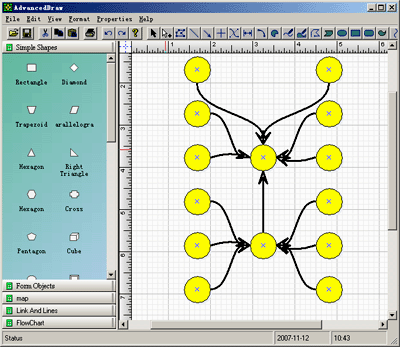
- Visio graph
editor like editor
- Antialised 2D
graph control graphics
- Alpha channel support
- Free rotation support
- Shape grouping support
- Very easy to use shape connection
- Show and snap to grid support
- Good blocks collection
- Rulers on different unit
- Print
preview graph source code
- Document can store in binary file, text
file and stream
-
| E-XD++
Draw/Graph Component
Library Professional Edition
is a MFC/Graph Component for developing Microsoft Visio like interactive 2D graphics and
diagramming applications. E-XD++ Drawing/Graph Component stores graphical objects in a node
(scene) graph and renders those objects onto the screen.
Visual
C++ MFC Library
|
E-XD++ Draw/Graph Component
product supports both vector and raster graphics on the drawing
surface. E-XD++ Draw/Graph Component includes all the features of XD++
MFC/Graph Component
Professional Edition, it also includes many new important feature of
Visio 2003 or
Visio 2007. |
| ToolBox is a free
Product for all Visual Studio developer, it includes three tools.
1. ToolBox --- Replace
all in files with any conditions as you asign. This tool
searches for the conditions you supply and replaces it in all the
files in the selected directory and it's subfolders. You can add as
many conditions as you want.
2. ToolBox ---Rname an
existing Microsoft Visual
Graph
/ Drawing Component
or
projects This tool help you rename an existing Visual Studio project. ToolBox
uses an intelligent algorithm based on the project type to identify
strings within the project files that contain the project
name/filename, |
3. ToolBox --- Backup
an existing Microsoft Visual Studio Project. This tool help you
backup an existing Microsoft Visual Studio Project, or VC++
Project.
All these tools are free without any charge, if you want learn more
about ToolBox or download a free copy,
|
The leader in visualization component -- FULL
VC++ Source Code Shipped!
XD++ Visualization Suite is the the world’s
leading VC++ and .NET visualization component. Renowned for incredibly rich
graphics, XD++ helps thousands developers build applications that offer
unparalleled functionality. Outstanding productivity lowers project risk and
reduces maintenance headaches. With 20 years of dedicated research and
development, UCanCode leads the market for visualization technologies,
providing outstanding customer support.
Powerful, flexible, and
easy to use Diagram Components.
Powerful and flexible enough to create diagrams exactly the way you want
them to appear. So easy to use that you will be able to prototype your
application in just a few minutes.
Save Time and Money and
gain Reliability.
A diagram is worth 1,000 words, and E-XD++ is shipped with more than 500,000 lines of well designed and well tested code! It is used by hundreds of the world's most quality conscious companies. It will saves you thousands of hours of complex coding and years of maintenance.
Learn more and
Download
News:
1 UCanCode Advance E-XD++
CAD Drawing and Printing Solution
Source Code Solution for C/C++, .NET V2025 is released!
2
UCanCode Advance E-XD++
HMI & SCADA Source Code Solution for C/C++, .NET V2025 is released!
3
UCanCode
Advance E-XD++ GIS SVG Drawing and Printing Solution
Source Code Solution for C/C++, .NET V2025 is released!
Contact UCanCode Software
To buy the source code or learn more about with:






 E-XD++Visual
C++/ MFC Products
E-XD++Visual
C++/ MFC Products