|
Promotional personalized
database document printing
Source Code Solution for C/C++, .NET
--
Variable database printing
solution

Product
Tour
E-XD++
and
UCCDraw
product
walkthrough
Screenshots
Applications
built
on
E-XD++
ToolKit
Product
feature comparison
A.NET/ VC++ Source Code Component for building any database printing applications that create dynamic, database-driven documents quickly and easily and personalize your promotional communications by varying text, graphics, barcodes, or entire layouts based on information found in your database.
If you are looking for
.NET/VC++ Source Codes for building a flexible and
easy way to use promotional software, UCanCode E-XD++
UCCPrint .NET/VC++ Source Code Solution is the
ideal source code component solution for you.
E-XD++ Print Solution allows you to personalize your
promotional communications by varying text, graphics,
barcodes, or entire layouts based on information found
in your database. E-XD++ Print Solution is a fast and
flexible variable data printing solution for the
production of simple and complex Variable Data Printing
jobs, ranging from small, medium to high volume output
quantities.
E-XD++ UCCPrint Solution can
use almost any database format. You can use drag-and-drop interface to
create links between your database fields and your document
quickly and easily. You can use the data from your database as-is in
your documents; or you can use conditional-processing features, data-parsing
features, and data-formatting.
With E-XD++ Professional Variable data
printing sourc code solution, a ready to use professional UCCPrint
application is shipped. (100% VC++ Source Codes of this applications
is also shipped). It has the following featrues:
Benefits
-
Design with 100% VC++ MFC.
100% VC++ Source Codes is
shipped with full edition.
You can use and ship this application now,
no need to do any changes to get it works.
Use your current design and database
applications
No need to consider your Printer, it will
takes database records automatic.
Variable Information Printing at
rated speed of the printer
Reduced print cost and print wastage
Efficient production process that saves
time and money
Open architecture - plugs in easily into
any existing workflow
Instant preview to see results before
printing to facilitate accuracy
Resource check on print stream reliability
Finishing options per record or per set
Easy to use: Drag and drop
Variable text
Any font in any color and any size
Conditional Database manipulation functions
Database filter
Printing layout & stacking order
Label printing
Multi page printing
Barcode printing
Use almost any database format
Building an application that create
personalized promotional documents in a trice!
If you want to building an application that
printing your promotional documents, do it with E-XD++ UCCPrint in saving
tons of months development time:
- Advertisements and Magazines printing
application
Brochures and Newsletters
printing application
Business Cards and Postcards
printing application
Catalogs and Flyers
printing application
Certificates and ID Cards
printing application
Direct Mailings
printing application
Gift Certificates and Discount Coupons
printing application
Mail Merge Letters and Marketing Mailers
printing application
Numbered Tickets
printing application
Preprinted Reply Cards and Labels
printing application
and much more !
Below are how uccprint solution works:
1. Running UCCPrint.exe.
2. Page size template support:
with the following dialog, you can choose any predefined
canvas size for your printing.
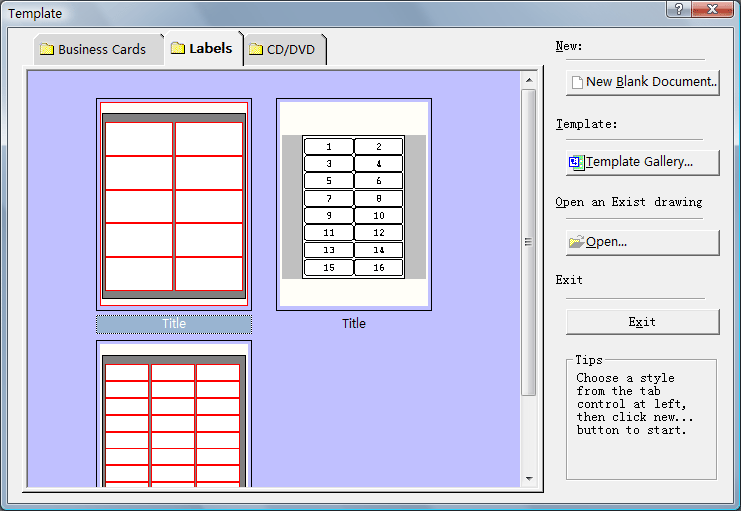
If you cann't find a size of your printing, you
can choose any one from this tab window at first, then you choose "File|Page
Setup" to define any new size of canvas as you want.
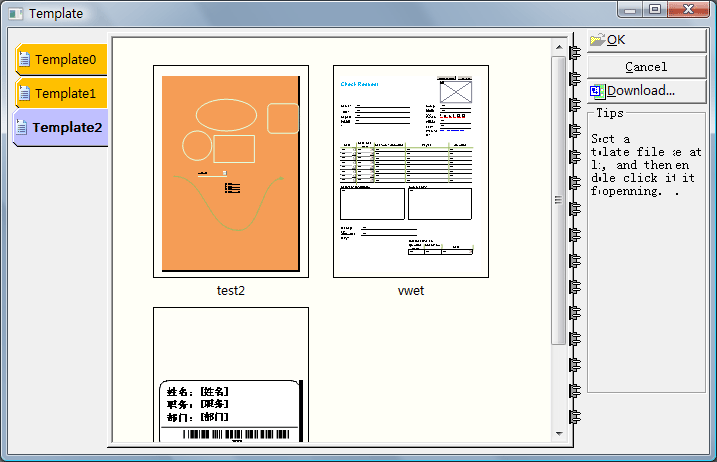
3. UCCPrint solution also full supports
template creating, saving, loading, and management etc. The small screen shot of
any template file is also stored at the header of its file, a template window is
shipped for showing any template files within a specify file folder. As below:
4. UCCPrint supports loading a predefine
image file as background, as below:
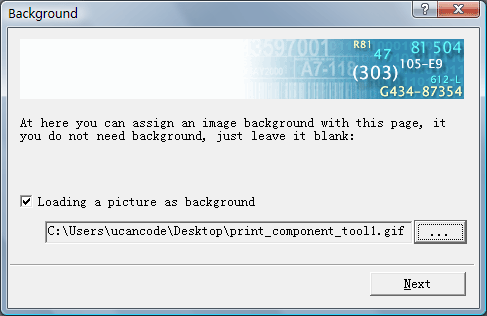
The selected image file will be placed at the
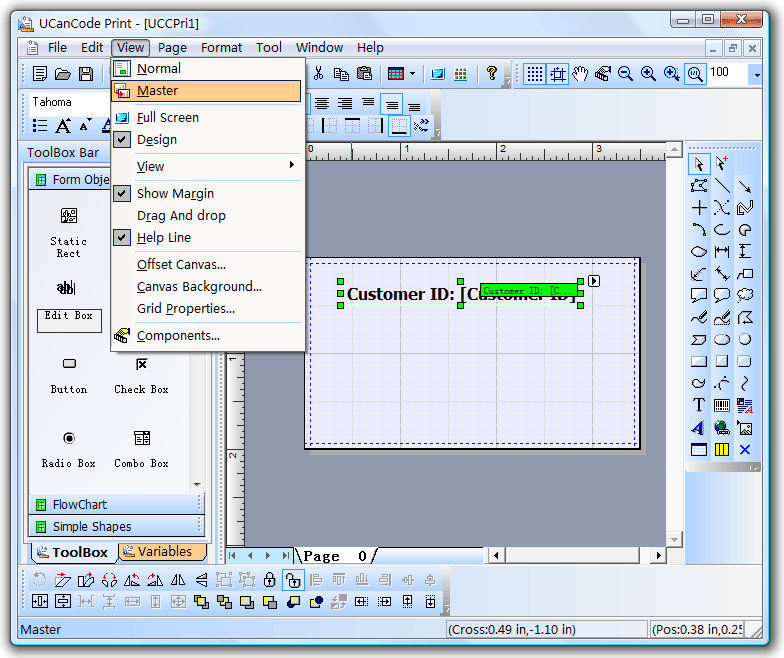
background of canvas, you can use "Master" view mode for editing.
5. Load any kind of database
records for printing, as below:
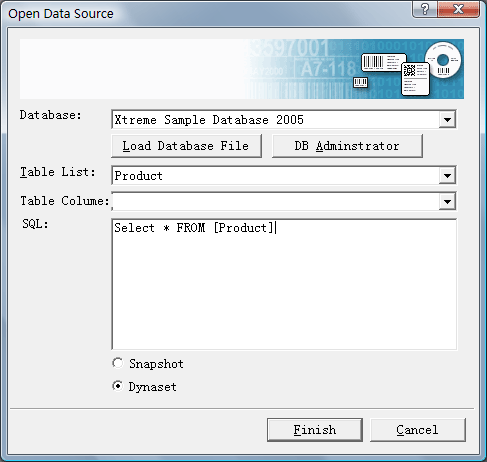
UCCPrint supports loading any kind of
database that supports ODBC Standard (Such as SQL Server, MS Access, DBF,
Excel, etc), and you can assign any kind query SQL for data loading. You can
open any database from file, or use "DB Administrator" for other database
loading.
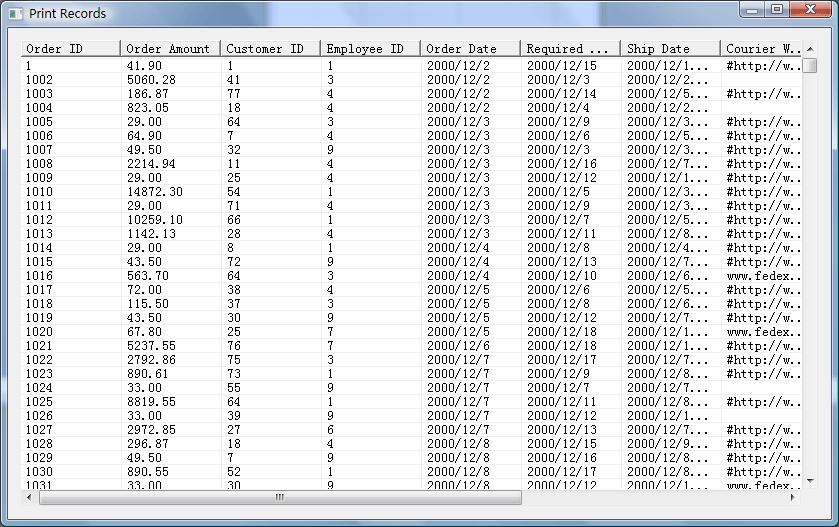
6. Viewing your data records, by choosing
"Tool | View Printing Record..." menu item, a record viewing dialog is
showing, as below:
7. All the printing records
variable fields will be showing at the list box of left side, as below:
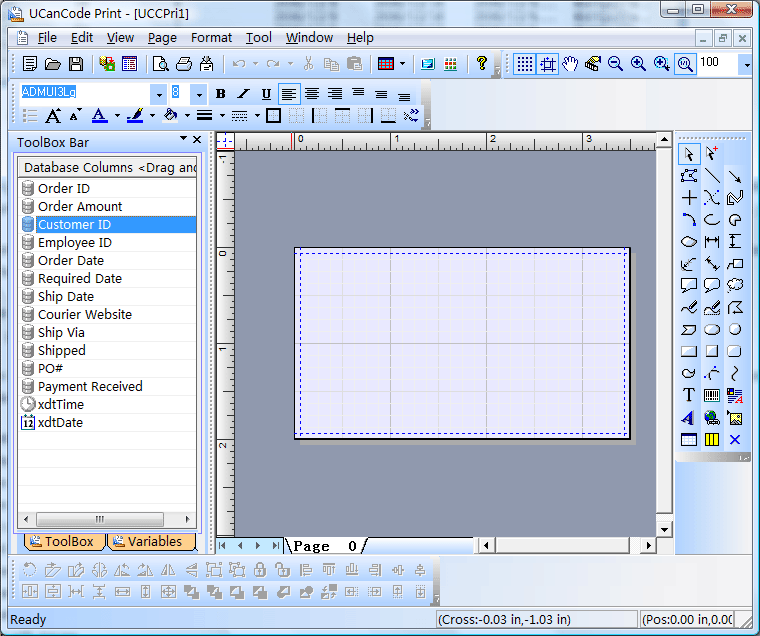
Now, you can drag and drop any variable field to
the canvas, a simple editbox shape or other shape (You can use "Tool| Options"
menu item for changing) will be bounded to this record field.
8. Setting the printing variable to any
shapes on the canvas:
1). From the toolbox window at left side, you
can drag and drop a simple text edit box shape on the canvas.
2). Choose this shape on the canvas, and right
click your mouse, and choose " Connect
Database Field Name…" menu item.
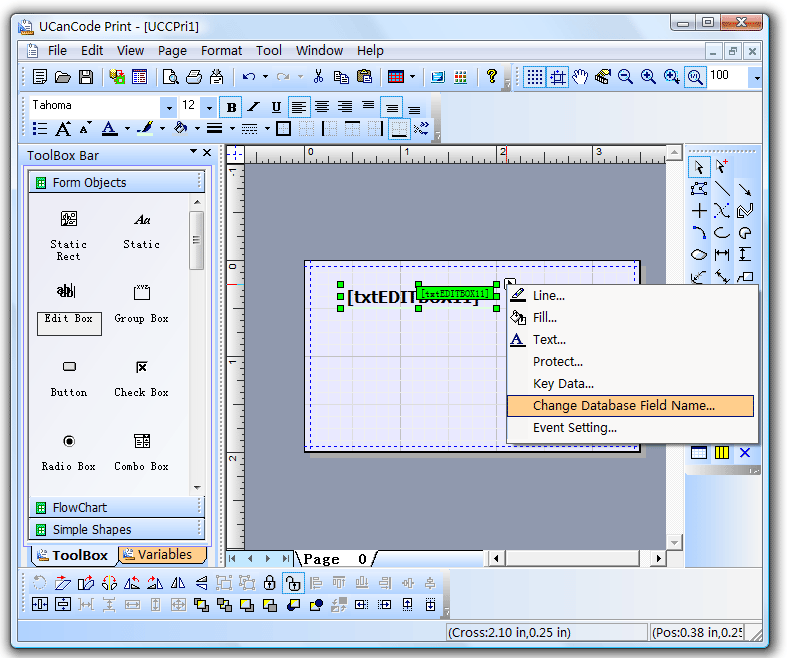
3). Then the following dialog will be showing:
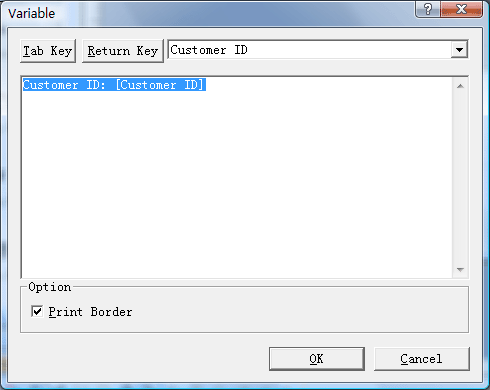
Within this dialog, you can assign any text for
printing, please remember the variable printing fields must be using "[]"
for including. You can assign any number of variable fields one time for a
single printing shape. For example:
" [Agent]
that is [AlertGroup]"
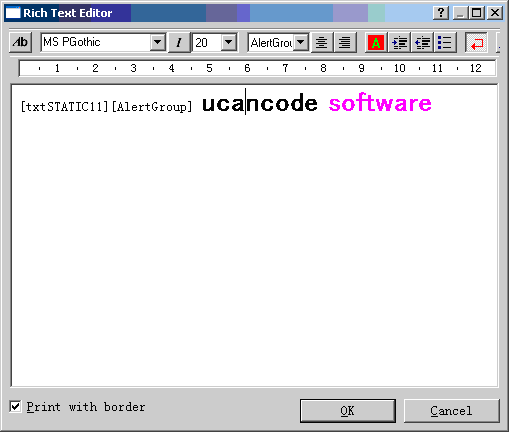
If you are choosing rich text shape, you will
have the following complex rich text editing dialog instead of:
9. Editing with "Normal | Master"
mode, for eaching printing canvas, you can edit the background by
choosing
"view | master" menu item.
10. Bar code printing:
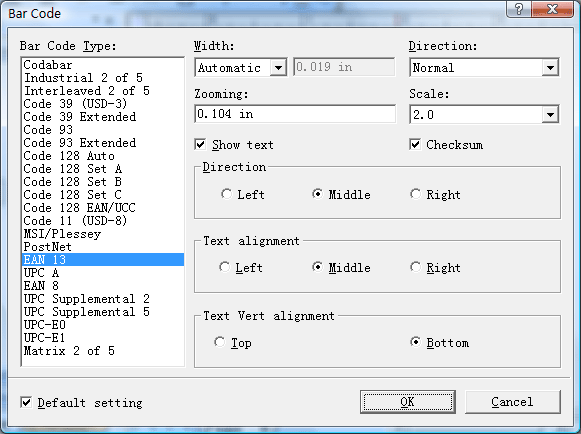
UCCPrint solution supports many kind of bar
code for printing, as below:
1). Choosing bar code drawing tool at
right side, and then drawing a barcode shape on the canvas.
2). Double click on this shape, and a bar
code setting dialog will showing, as above screen shot.
3). To connect a database record filed by right
click on the this barcode and then choosing " Connect
Database Field Name…" menu item.
11. Change canvas size, just choose "File
| Page Setup..." menu item.
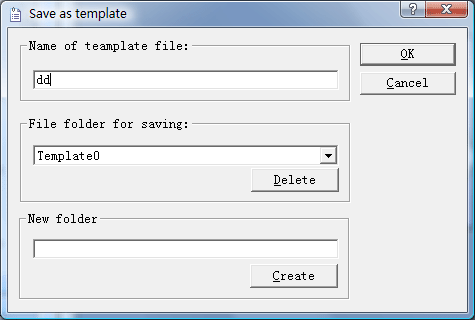
12. Save template file, just choose "File
| Save as template..." menu item.
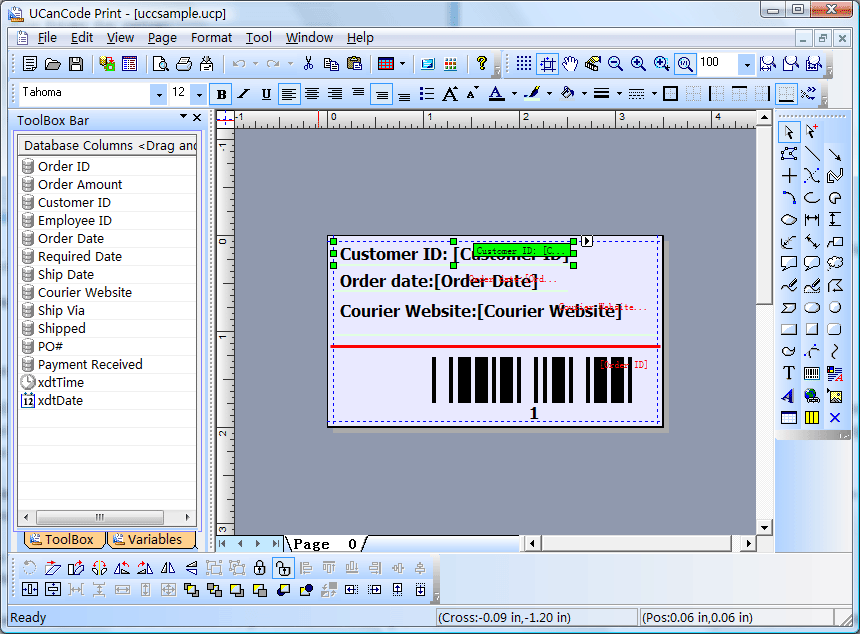
13. Border printing:
If you don't want to print the border of
variable shape, just choose " Connect
Database Field Name…" menu item
and uncheck the "Print border" button.
Sample:
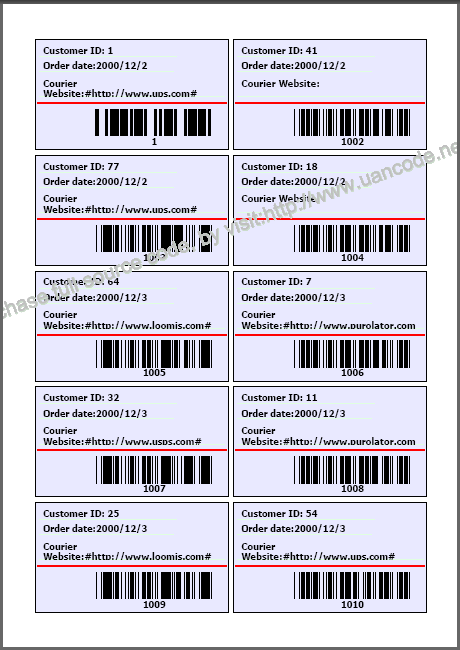
Printing result as below:
 report-print-tool.pdf
Note: For
using uccsample.ucp file, you must open database file "xtreme.mdb" and choose
"Orders" table.
UCanCode Print ActiveX Control
For Visual Basic, C#, Delphi or other languages
developers, ucancode had prepared a Print OCX Control, it's UCanCode Print
ActiveX Control. It has the following features:
1. Can be called with any C#.NET, Java,
Delphi or VB languages.
2. Can be used by web.
3. It is based on UCanCode leading label
and printing (UCCPrint) solution, all the features of UCCPrint can be called
with this Print ActiveX Control.
4. It supports bar code and database
loading and printing, it has label design and printing two modes.
5. All the features can be full
customized.
6. The source codes of this print control
can be purchased with E-XD++ Enterprise Suite.
7. With our consulting service, we can
help you do any modify with this print ocx control to meet your own specify
requires.
8. With all the other
features of
UCanCode Draw
Control.
9....
Download and Try UCanCode Print
Control
 Purchase
UCanCode Print Control Purchase
UCanCode Print Control
Building any
personalizing variable data documents application has never been so easy!
By simply dragging and
dropping database fields onto the document layout, E-XD++ UCCPrint
Solution creates a link between the database field and your document.
E-XD++ UCCPrint Solution gives you an instant preview and provides
you with a powerful resource checking option to ensure proper printing. Utilize
the comprehensive set of conditional rules for database driven
composition.
With E-XD++
Component,
you can add advanced printing functionality to your
applications. The E-XD++ Library is a 100%
VC++ data
rendering and visualization system, built
specifically for Visual Studio .NET and designed to
bring your User Interface to the printed page. Now you
only need a few days for building a very powerful label
print or report print application.
Through its Java, .NET and C++, and Flex/AIR
graphics libraries and components, ucancode provides the industry’s
most comprehensive set of graphics tools for creating sophisticated,
interactive user displays. ucancode's graphics products enhance decision-making
speed and ability by making vast quantities of complex data more comprehensible
and manageable for users. Developers save 50 to 80 percent of development time
when creating displays with ucancode Visualization.
Download Prebuild Eval Kit of
UCCPrint Solution
The leader in visualization component -- FULL VC++
Source Code Shipped!
XD++ Diagrammer Suite is the the world’s
leading VC++ and .NET visualization component. Renowned for incredibly rich
graphics, XD++ helps thousands developers build applications that offer
unparalleled functionality. Outstanding productivity lowers project risk and
reduces maintenance headaches. With 20 years of dedicated research and
development, UCanCode leads the market for visualization technologies, providing
outstanding customer support.
Save Time and Money and
gain Reliability.
A diagram is worth 1,000 words, and E-XD++ is shipped with more than 500,000 lines of well designed and well tested code! It is used by hundreds of the world's most quality conscious companies. It will saves you thousands of hours of complex coding and years of maintenance.
The
VC++ source codes of this sample is shipped with E-XD++
Library Enterprise Edition,
order it now.
Contact UCanCode Software
To buy the source code or learn more about with:
Previous-->
True
Microsoft word like table Component Control Solution
--
-- Full VC++ Source Codes
|
|






 E-XD++Visual
C++/ MFC Products
E-XD++Visual
C++/ MFC Products




