 |
E-XD++ Enterprise Edition -- Product Information
|
|
|
|
8. Projecting map mode:
1). Drawing map
mode:
In E-XD++ you can set the size of panels and windows freely. E-XD++ also supports the following projecting
map mode:
// MM_TWIPS
// MM_HIMETRIC
// MM_LOMETRIC
// MM_HIENGLISH
// MM_LOENGLISH
// MM_TEXT
// MM_ISOTROPIC
// MM_ANISOTROPIC
E-XD++ provides a well-designed unit conversion class called
CFOScaleUint. You can make conversion freely without having a mathematical book with you.
FUNIT_INCHES, //0
FUNIT_FEET, //1
FUNIT_MM, //2
FUNIT_CM, //3
FUNIT_METERS, //4
FUNIT_KM, //5
FUNIT_YARDS, //6
FUNIT_MILES, //7
FUNIT_POINTS, //8
FUNIT_TWIPS //9
The following image is the result we got from a
CAD application by using MM_HIMETRIC projecting mode. This application uses the canvas printing function so that it can show the black background correctly when printing.
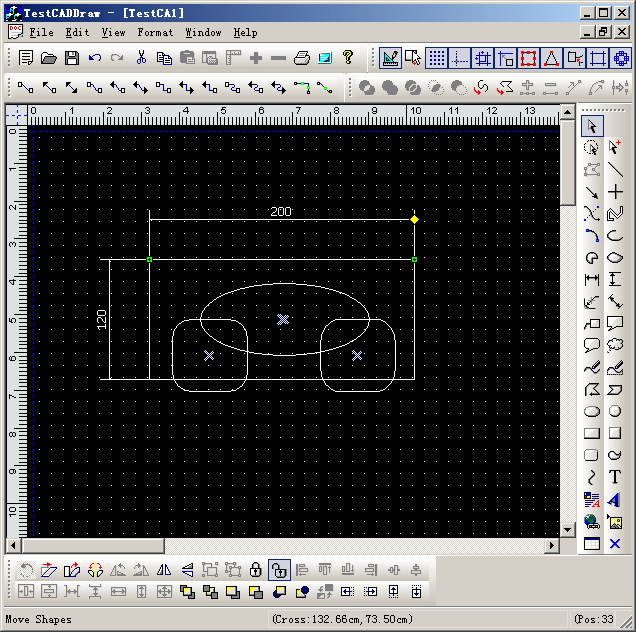
To change the projecting mode for printing, use the following functions:
// Change the map mode of the view
// nMapMode -- new map mode
virtual void ChangeMapMode(const int &nMapMode);
Note: It also supports
to change UI scale.
2).
the axis to up or down.
It means you can create any CAD like
application with it's origin at bottom left of canvas.
|






 E-XD++Visual
C++/ MFC Products
E-XD++Visual
C++/ MFC Products 



